Adding a Medical Note

Sometimes Medical History information needs to be entered without filling in a full form. Notes can be added to a patient medical history file as a reminders to yourself or other staff of important information. Notes can be configured to pop up under specified circumstances.
To add a medical Note:
-
Open the Patients file and enter the Medical Tab.
-
Click the
 button to start creating the note.
-
-
Enter the note information (You can use Quick Notes on the right hand side to help you).
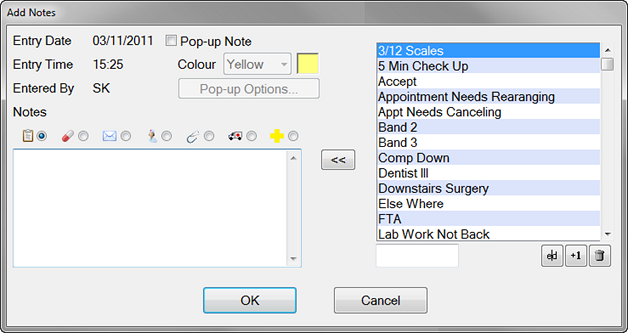
3. Choose the Note Type by clicking on one of these icons
General note 
Note about a prescription 
Referral letter to/from a specialist 
Notes to/from a doctor 
Notes related to an examination 
Notes regarding patient hospitalisation 
Notes regarding infectious or medical conditions 
4. By clicking Pop Up Note you can decide if you want this note to popup and when. Once ticked you can choose the colour of the pop up note and by clicking Popup options when and where the note pops up.
5. Once complete click OK to submit the note to the Medical file.
Comments
0 comments
Please sign in to leave a comment.